
E-learning localization adapts a course so it works in another language and culture, changing examples, images, units of measurement, and references rather than only the words. Translation converts text. Localization adapts the whole learning experience. Most global training programs need both, and the difference decides whether learners engage with the course or switch off.
If you’re part of a global organization, you know it’s not enough to give your local teams the same e-learning course in English. Learners in different regions often speak different languages, follow different customs, and value different teaching styles.
E-learning localization adapts your courses, so they feel natural and relevant in every market. It involves rethinking examples, adjusting images, and making sure every reference fits the local culture.
Here’s what happens when you do it right:
- people learn faster
- employees feel more valued
- learners retain the knowledge longer
In this article, we explain the difference between e-learning translation and localization, discuss why localization matters, dive into practical insights, and share real examples of companies that did localization right. By the end, you’ll have a clear roadmap for e-learning content localization that helps your training shine in any language.
Key takeaways
- Translation changes words, localization changes the experience. Examples, images, units, tone, and layout all shift, and skipping that step is what makes translated training feel imported.
- Design for localization before you write. Neutral layouts, room for text expansion, and separate source files cost nothing upfront and save a redesign per language later.
- Local subject-matter experts beat external vendors on relevance. They can adjust examples to your company, and they turn review from a bottleneck into a fast pass.
- Start with fewer languages than you think. A language you can deploy and review well is worth more than one where you cannot control quality.
What is e-learning localization?
E-learning localization means going beyond swapping English words for Spanish, French, or Mandarin. It means fine-tuning your entire learning experience, so it aligns with local cultures, regulations, and needs.
Sure, e-learning translation is part of it—words matter—but localization also looks at things like the tone of examples, the units of measurement used in exercises, the cultural references in case studies, and even the look and feel of the interface.
For example, imagine you’re localizing a sales training course that your US team created for France. Here are a few things you would do aside from translating the text into French:
- change baseball references to football references
- convert dollars to euros
- add subtitles or record a voice-over in French for the videos
The goal is to make the training feel like it was created for French learners from the start, not forced to fit them later.
What is the difference between e-learning translation and localization?
Let’s be clear. Translation changes the text from one language to another. Localization looks at the entire learning experience.
E-learning translation converts English words into Spanish, but e-learning localization checks if the Spanish version uses references that learners in Mexico or Spain will find meaningful.
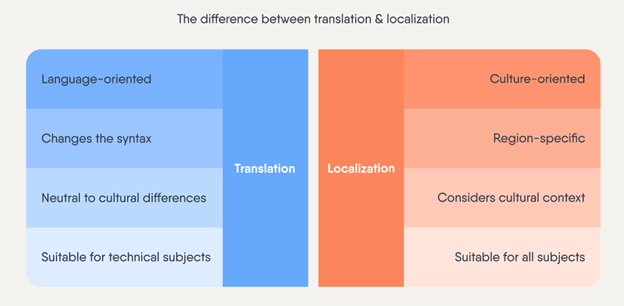
Here’s a simple way to look at it:
- Translation: translating everything word by word.
- Localization: Refining the entire message, style, and approach so it feels right for that place.
Why does e-learning localization matter?
E-learning localization matters because learners who work through training in their own language and cultural context understand it faster, retain it longer, and apply it more accurately on the job. Poorly localized training gets ignored, which means the money spent building it returns nothing.
Without proper localization, your e-learning might feel stiff, confusing, or irrelevant. If learners don’t connect with examples or struggle to follow the content, they’ll lose interest fast.
What are the benefits of localizing e-learning content?
Localization may seem like an extra step, but it often pays off over time. You won’t need a new course from scratch for every market. Instead, you’ll edit or tweak the “master course.” And here are the benefits you’ll get out of it:
You save costs on training
Localizing is usually cheaper and easier than building new courses every time you expand into a new market. With a well-planned e-learning localization strategy, you can adapt your content more efficiently and spend less in the long run.
Your learners understand and recall the information better
People learn better when the material feels familiar. If you localize not only the language but also the cultural references, examples, and visuals, learners can connect with the content right away.
For instance, a sales scenario that uses local currency and common shopping habits is more meaningful than one featuring foreign references.
This leads to deeper understanding, better retention, and higher completion rates.
You create a more inclusive learning culture
By speaking learners’ languages—both literal and cultural—you show respect for their backgrounds. This helps everyone feel included and valued.
As a result, learners approach the material with a positive mindset. They’re more likely to engage, participate, and share feedback, which leads to a stronger learning community across your organization.
You keep messaging consistent across languages and cultures
Localization helps you share the same core message across your company, no matter where learners are. You’ll maintain your brand’s tone and standards while still giving local markets what they need.
You stay compliant with local laws and standards
Many regions have rules about delivering training in the local language or following specific cultural protocols. Localizing your e-learning content helps you meet these requirements and avoid compliance issues.
For example, in Quebec, Canada, materials for employees must be available in French in addition to English. In China, regulations and cultural expectations often call for training to be provided in Mandarin—with content that respects local traditions and business practices.
How to plan your e-learning localization strategy
A good e-learning localization strategy begins before you write a single line of text. Start by thinking about your target audiences and the languages and cultures you’ll serve.
1. Build your course with localization in mind
If you know you’ll need courses in multiple languages, design your original course with localization in mind. Avoid cultural references that might not translate well, and leave enough white space in your layouts for longer translated text. Also, think about compliance rules that might differ from country to country.
2. Use an adaptable design
Your course’s design should make switching from one language to another easy. This approach, sometimes called “globalization,” involves using neutral layouts, flexible fonts, and interface elements that adapt easily. It’s much simpler to adjust your “master course” if you’ve built it to handle multiple languages from the get-go.
3. Consider transcreation for tricky parts
Transcreation is where translation meets creativity. Sometimes a direct translation doesn’t capture the original course’s tone or emotion. This often happens when there’s a joke or pun involved. In that case, you need to come up with a similar play on words that local learners would appreciate.
Apple used the slogan “small talk” to promote the new iPod Shuffle in 2009, but this pun didn’t work in other languages. The local marketing teams had to get creative with transcreation. (Heads off to the copywriters!)

In Latin American Spanish, the slogan became “mira quién habla.” Directly translated, this means “look who’s talking.”
In Canadian French, it became “petit parleur, grand faiseur.” This means “says little, does a lot.”
If your training includes humor, stories, or cultural idioms, consider using transcreation!
4. Adapt multimedia and visuals
Check every image, video, and graphic to be sure it makes sense locally. A photo that feels neutral in one place might feel odd or even offensive somewhere else. The same goes for currency, measurement units, date formats, and color schemes.
5. Create a style guide and a checklist
Draft a style guide for each language. Include things like tone, level of formality, and examples of how to handle common terms. A style guide keeps everyone on the same page and reduces mistakes. Also, use a checklist when localizing. This ensures you don’t forget to adapt any key part of the course—like subtitles, captions, or tooltips.
6. Involve local colleagues
Share the localized course with subject-matter experts (SMEs) in your target region. Ask for them to provide feedback or edit the content directly.
Do the examples feel natural? Is the tone right?
7. Focus on technical details
Make sure your source files are editable. It’s easier to add subtitles or change an image if you have access to the original files. Also, consider the length and direction of text: some languages use more words to say the same thing, and some are read from right to left.
Should you localize e-learning in-house or outsource it?
There’s no single “best “way to localize your e-learning content. The right approach depends on your team’s language skills, expertise, budget, and timelines. As you decide how to proceed, consider the tools and technology that can lighten your load.
Outsourcing localization
Many companies hire agencies or freelancers to handle the translations. This can work well for simple, straightforward projects. However, you’ll likely have less control and may need multiple review rounds to ensure the cultural fit. If outside vendors aren’t familiar with your subject, the translations might feel off to learners.
In-house localization
If you have local SMEs, try keeping localization in-house. This approach gives you more control over the content. Your SMEs can adjust examples and references to make them specific to your company.
Plus, localizing content in-house lets you deliver training to your global teams much faster, since you don’t have to rely on external vendors.
To achieve this, look for authoring tools with built-in translation.
Did you know?
Easygenerator’s EasyTranslate feature lets you translate content into 75 languages—including video subtitles. Its collaborative platform lets local SMEs review and edit content directly.
Note that machine translation tools are better than ever, but they often miss cultural nuances. So, you’ll still want a human eye.
Adaptive MT engines like Lara Translate go a step further than general AI translation. They apply glossaries and learn from past corrections, so the output they produce for a specific domain improves over time rather than starting from scratch on every request.
Combining outsourced and in-house localization
You don’t have to pick one approach and stick to it. You can combine the two.
You may use machine translation for basic text, then let your in-house SMEs review and refine it. For highly technical content, you may hire an external agency or freelancer for reviews and edits.
By mixing people, tools, and methods, you can create a localization process that works for your company.
How to translate and localize your e-learning content with Easygenerator
You might be thinking, “This all sounds good, but how do I actually do it?” Here’s a quick rundown:
translate your courses and video subtitles (if applicable) into more than 75 languages—including German, French, Chinese, Spanish, Portuguese, and Arabic—with just a few clicks.
This feature is available as an add-on for all existing Easygenerator customers. New customers can also add it to any Team or Enterprise plan.
How to enable the translation feature
To enable this feature:
- Go to the Configure tab.
- Select Language and translation.
- Click Course translation > Automated translation (Amazon AWS).
- Choose Translate course.
If you would like a walkthrough, you can always request a demo.
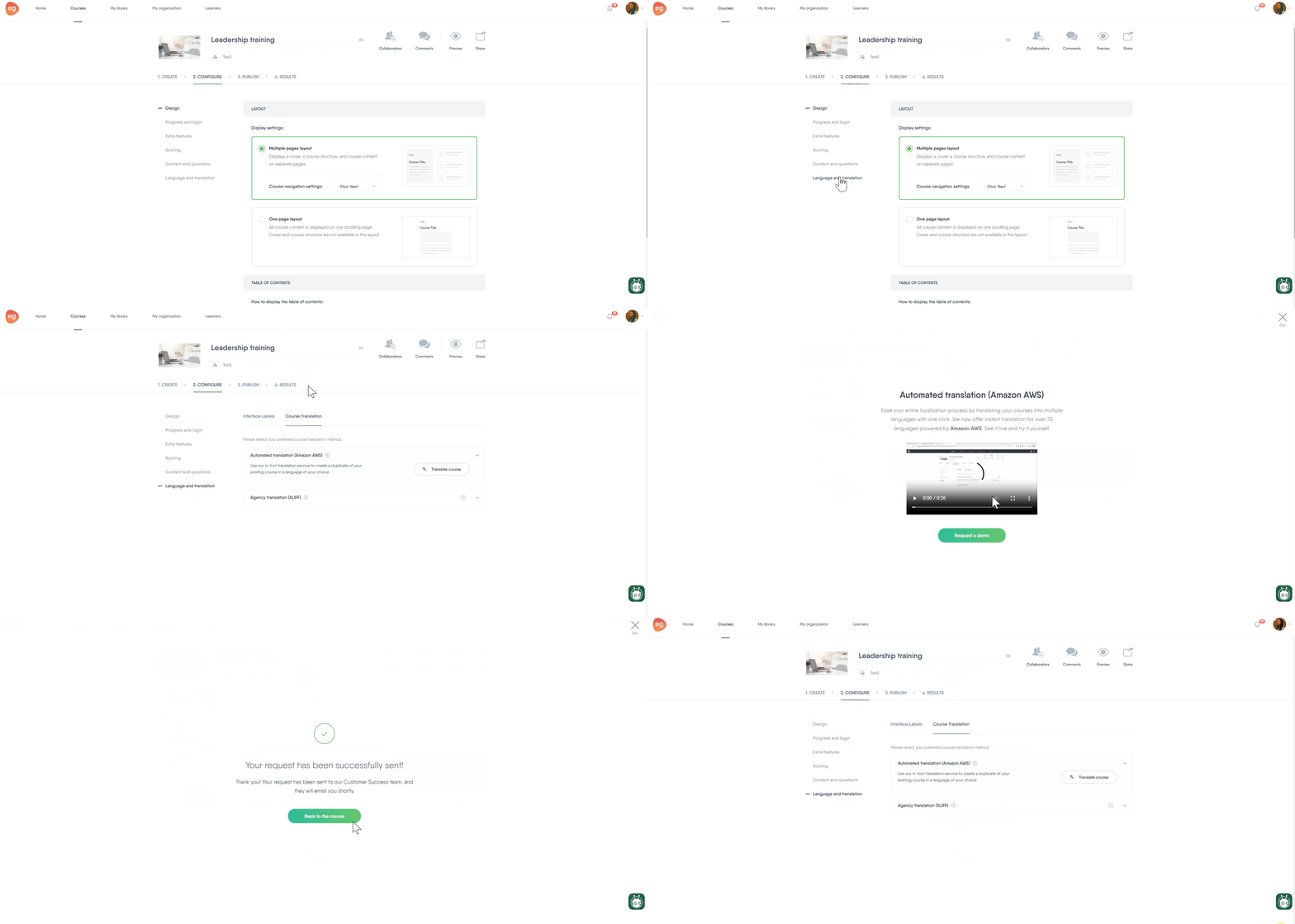
Step-by-step guide to translate your course
Once the feature is enabled for your account, you can translate your courses by following these steps:
- Navigate to Configure > Language and translation > Course translation > Automated translation (Amazon AWS).
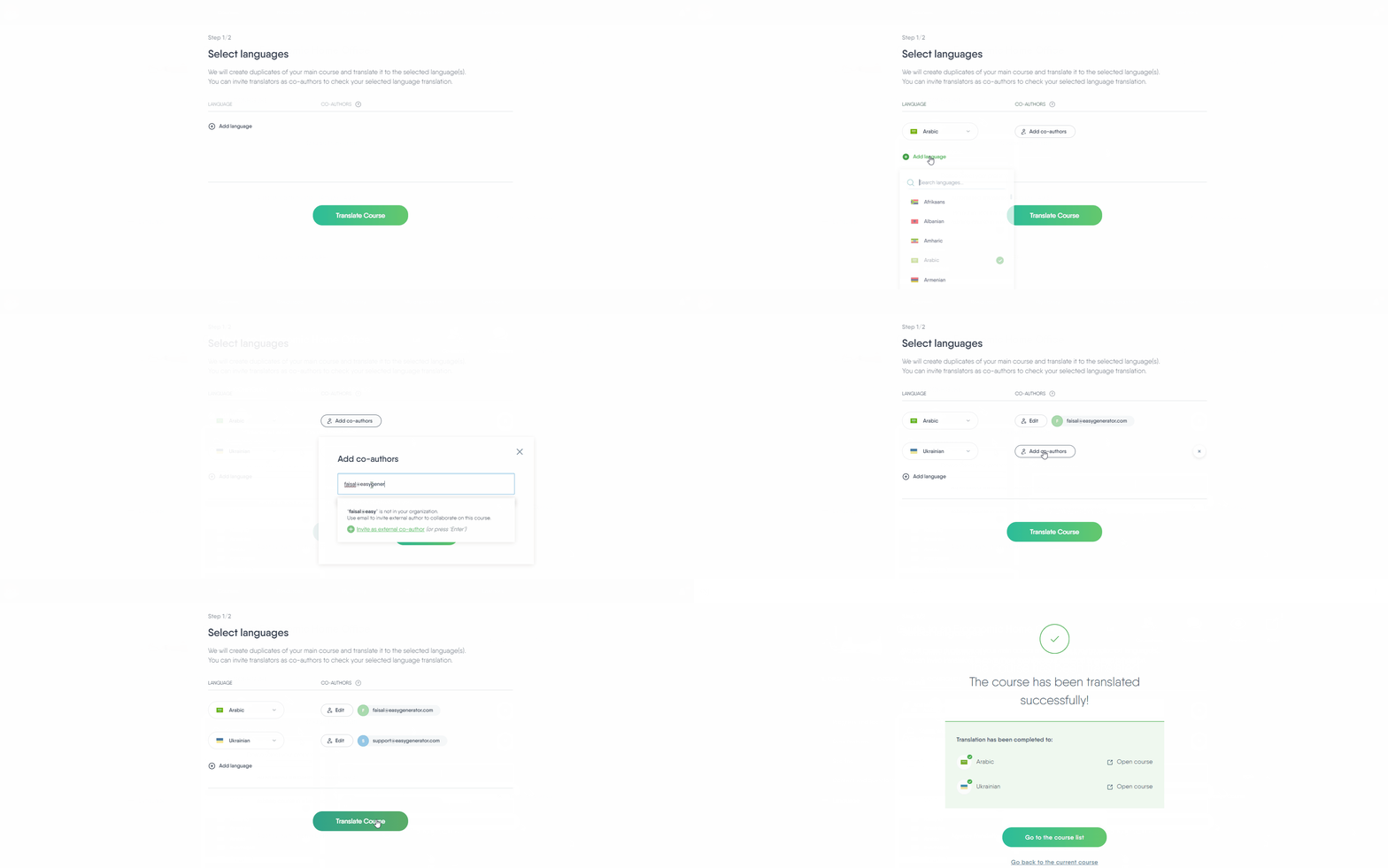
- Select Translate course and choose the target languages. You can also choose multiple languages.
- For each selected language, you can:
- Assign a co-author to proofread the translation.
- Add co-authors directly to the translated courses using the Collaborators button.
- If your course includes videos with subtitles, go to Advanced settings and enable the Translate subtitles/CC option. (This step is optional.)
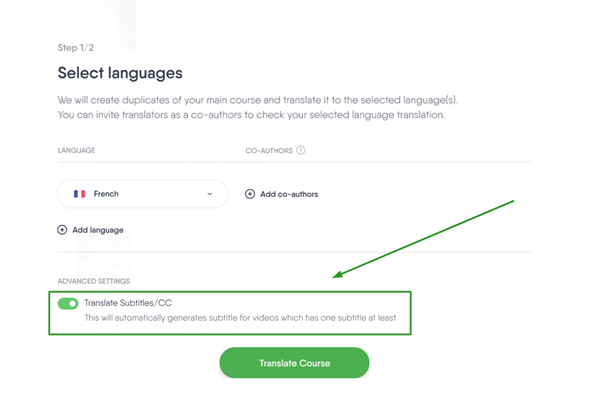
When you’re ready, click Translate.
Common e-learning localization challenges and how to solve them
Adapting cultural references
If an example doesn’t resonate, replace it with something more fitting. Instead of “summer barbecue” in the US, consider “evening market gathering” in another region. The aim is to paint a picture that learners instantly understand.
Clarifying acronyms and jargons
If you have internal acronyms, spell them out at first mention. Some terms might not have a neat local equivalent. If that’s the case, explain the term in plain language or pick a simpler alternative.
Adjusting layouts for varying text length
Plan for text expansion. Some languages need more characters to say the same thing. Leave room in the layout, so you’re not scrambling to redesign pages later.
Keeping the master course stable
Don’t edit the master course after localization starts. Every change means more rework for your translators and co-authors.
Where to start with e-learning localization
Building a good e-learning translation strategy pays off. It’s a key part of delivering training that works for all your employees—worldwide.
Learners won’t feel like they’re sitting through a one-size-fits-all program. They’ll feel that the training was made for them, which helps them learn faster and remember more.
In the end, that’s what effective training is all about.